
How to Order & Submit Custom Laser Engraved Files at LCI Paper
So, you’re ready to personalize gifts, favors, or keepsakes with your custom logo or design—great choice! To ensure your items come out crisp, clean, and exactly how you envision, we require all artwork to be submitted as Laser-Ready.
But what exactly does “laser-ready” mean? How do you prepare a file that meets our engraving standards? We’ve got you covered.
Below, we’ll walk you through everything you need to know:
- What Does Laser-Ready Mean?
- Simple vs Complex Laser Designs
- Laser Engraved File Requirements
- What Is A Vector File and How To Create One
- How to Submit Your Custom Laser Files When Ordering Engraved Gifts
What Does Laser-Ready Mean?
A laser-ready file simply follows our specific formatting requirements for laser engraving. When your file meets these standards, you set yourself up for fast approval, smooth processing, and flawless results.
Submitting the correct file format also saves time by eliminating unnecessary back-and-forth, file conversions, or design issues that may otherwise delay your order.
Regardless of the complexity of your engraving file, to ensure your file is laser-ready for LCI Paper, please only submit RGB Vector Files for your custom engraving.
Simple Versus Complex Laser Designs
Not all artwork is created equal! Some designs can be engraved as-is, while others require a closer look. Depending on your design, you may need a custom quote.
- Simple designs (basic shapes, text, initials, etc.) are often ready to go.
- Complex designs (intricate shapes, logos, fine details, etc.) will require a custom quote.
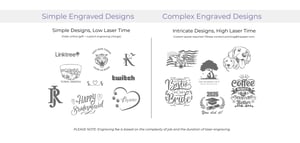
If your design consists of basic shapes like circles or a text based logo, for a one-time set up fee of $35*, we can custom engrave it on your choice of personalized gifts. However, if you design is more complex we will require you to submit your file for review. Pricing varies with the complexity of your specific artwork and the time it will take to engrave your design.
If your artwork is more intricate or you’re unsure whether it qualifies, we recommend requesting a custom quote by contacting our print department directly. We’re happy to help evaluate your file.
Additional fees may apply to complex laser designs.*
Laser Engraved File Requirements
To produce the highest-quality engraving possible, we need your files to be compatible with our advanced laser systems. Here’s what you need to submit:
Laser Engraved File Requirements:
- RGB Color Mode
- Vector Format (AI, EPS, SVG, or PDF)
- Saved as a PDF and .SVG for final submission
- All elements outlined in solid black for engraving
- Correctly Sized (see product description)
- Font files included (if using custom fonts)
We accept RGB vector files only—all other file types are incompatible with our engraving equipment.
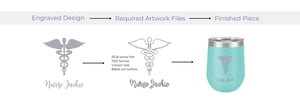
If you’re using custom fonts, make sure to send us the font files along with your artwork. This ensures your text displays and engraves exactly as you designed it.
What Is A Vector File and How Do I Create One?
A vector file is a type of digital graphic made up of paths rather than pixels and is often shown with a file extension such as .svg, .ai, or .eps. Unlike raster images (like JPEGs or PNGs), vectors can be scaled to any size without losing clarity.
You can create RGB vector files using programs such as Adobe Illustrator, CorelDRAW, or Inkscape.
Why is this important?
Laser engraving relies on precision. When you submit an RGB vector file, our laser system can follow the exact paths in your design to produce a clean, accurate engraving—no blurring, no distortion, just perfect results.
How to Save Your Design as a Vector File:
Here’s how to make sure your design is saved correctly:
-
Create Your Design in a Vector-Based Program
Use software like Adobe Illustrator, CorelDRAW, or Inkscape. -
Set the Color Mode to RGB
Our systems require RGB files—not CMYK. -
Convert Text to Outlines (or Include Font Files)
This step ensures your text appears exactly as designed. -
Set Artwork to Black Only
Use solid black (R:0 G:0 B:0) to indicate all engraving areas. -
Save as a PDF
Export your file as a PDF, making sure vector paths are preserved.
If you’re unsure whether your file is vector-based, look for file extensions like .ai, .eps, .svg, or .pdf. Still have doubts? Reach out—we’re happy to take a look.
For a step-by-step guide into creating an RGB Vector File in each the suggested programs, click here.
How to Order Personalized Engraved Gifts at LCI Paper
- Choose from our pre-designed artwork at no extra cost
- Create your own text-based design in our interface, or
- Submit your own custom artwork or logo to be engraved for a one time set-up fee of $35*
Use the steps below to assist you with placing your order on lcipaper.com.
Steps to Ordering Engraved Gifts with Custom Designs:
-
- Select your engrave-able item from our shop.
- Choose your Format & Design – Choose one of LCI’s pre-made designs, Create your own text-based design online, or Supply us with your Custom Artwork*.
- Personalize your Item using the editable text boxes in the design interface (e.g., names, dates, etc.).
- Review & Approve your Digital Proof online or get a Photo Proof before the engraving of your order.
-
- Please allow 2-3 business days for order processing of photo proofs.
-
- Finalize Order and Add-to-Cart.
- Now your ready to Checkout and enjoy your custom engraved gift. We’ll engrave and ship your order 4-7 business days after approval.
Additional fees may incur for custom artwork with complex laser designs and custom quotes.*
How to Submit Your Laser Files When Ordering Custom Engraved Gifts
If you’d like to submit your own custom design or logo, simply select the Custom Artwork option and use the provided drop-box link to upload your laser-ready files after checkout (RGB Vector File and Outlined PDF). If you have any questions, please email our print department with your artwork files and we’ll be happy to assist you in ordering!
For double engraving or variable data (different text on each), please contact us for a custom quote using this form.
For complex designs and custom quotes, pricing may vary. Please contact [email protected] for more info.*
Ready to Order?
Shop Tumblers | Shop Camp Mugs | Shop Drink Sleeves | Shop Coasters | Shop Pets | Shop Kids
We Can Engrave More Than Just Our Products!
Did you know we also offer custom laser engraving on your own supplied items? Whether it’s a tumbler, notebook, or wooden keepsake, we’re open to working with you—just contact us first to schedule a consultation.
Questions? Let’s Talk!
Whether you’re submitting your first laser file or just need a little help fine-tuning it, we’re here to support you. Reach out with your questions or submit your design for a free custom quote today.
You may also like:
About Digital Laser Cutting | All Personalized Gifts | How to Create and Save a Vector File for Laser Engraving