
Can I Submit a Google Sheet for My Spreadsheet?
The short answer: Yes! You can absolutely use Google Sheets to create your guest names and addressing (or table numbers) spreadsheet if you do not have Microsoft Excel. However, there are a few steps you need to follow to ensure your file is compatible with our system. Keep reading to find out how to save and format your Google spreadsheet correctly!
How to Save Your Google Sheets as a CSV File
Follow these simple steps to create and save your spreadsheet in the correct format:
-
- Open Google Sheets and create a new spreadsheet.
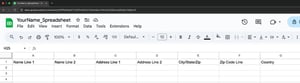
- Use the correct column titles as shown in the image below. If you change these titles, our system will not recognize them, and your file will not upload correctly.

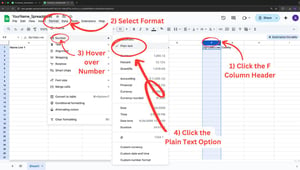
- Format the Zip Code Line column to Plain Text to avoid missing leading zeros.

- Fill out your spreadsheet with guest names and addresses.
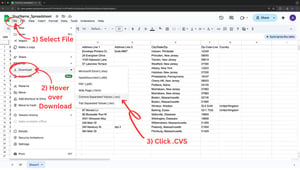
- Save your spreadsheet as a CSV file by following these steps:
- Click File in the top menu.
- Hover over Download.
- Select Comma Separated Values (.csv).
- Save your file in your desired location

You should now be able to successfully upload your spreadsheet without the need for download or pay for Microsoft Excel or any additional programs!
For more information uploading your files and on spreadsheet alternatives click here.
Other Things to Consider When Creating Your Spreadsheet
To avoid formatting issues or errors, keep these key tips in mind:
-
- Watch out for converting/missing leading zeros in your Zip Codes.
- Avoid inputting line breaks.
- Formatting transfers directly to printed pieces. (ie: capitalization, spaces, misspellings)
- Be mindful of special characters and font limitations.
- Do NOT convert your data into a table.
- Leave blank sections truly blank.
- Column titles must be labeled as shown above.
- LCI Paper only accepts CVS files (Comma Separated Values) for addressing spreadsheets.
By following these steps, you can ensure a seamless upload and a flawless final product!
Shop Envelope Addressing Print Services
You may also like:
How to Fix Missing Zip Code Zeros in Google | How Do I Supply My Envelope Address List? | How to Order Printed Envelopes